Use workspaces
Workspaces affect how you organize and view resources in your daily work. This section explains the different workspace types and how to switch between them.
Personal vs Workspace
There are two main types of working contexts:
Personal workspace
This is your private, user-specific space. Resources here are either:
- Created directly by you, or
- Shared directly with you via private sharing.
Only you and users you’ve explicitly shared with can view or edit these resources.
Shared workspace
This is a collaborative space designed for teams or for organizing resources by project. All workspace members can view resources within the workspace. Access and permissions depend on each member’s assigned role.
Select a Workspace
You can switch between workspaces using the workspace dropdown in the left sidebar.
To select a workspace:
- Locate the workspace dropdown in the left sidebar.
- Click the dropdown.
- Select the desired workspace from the list.
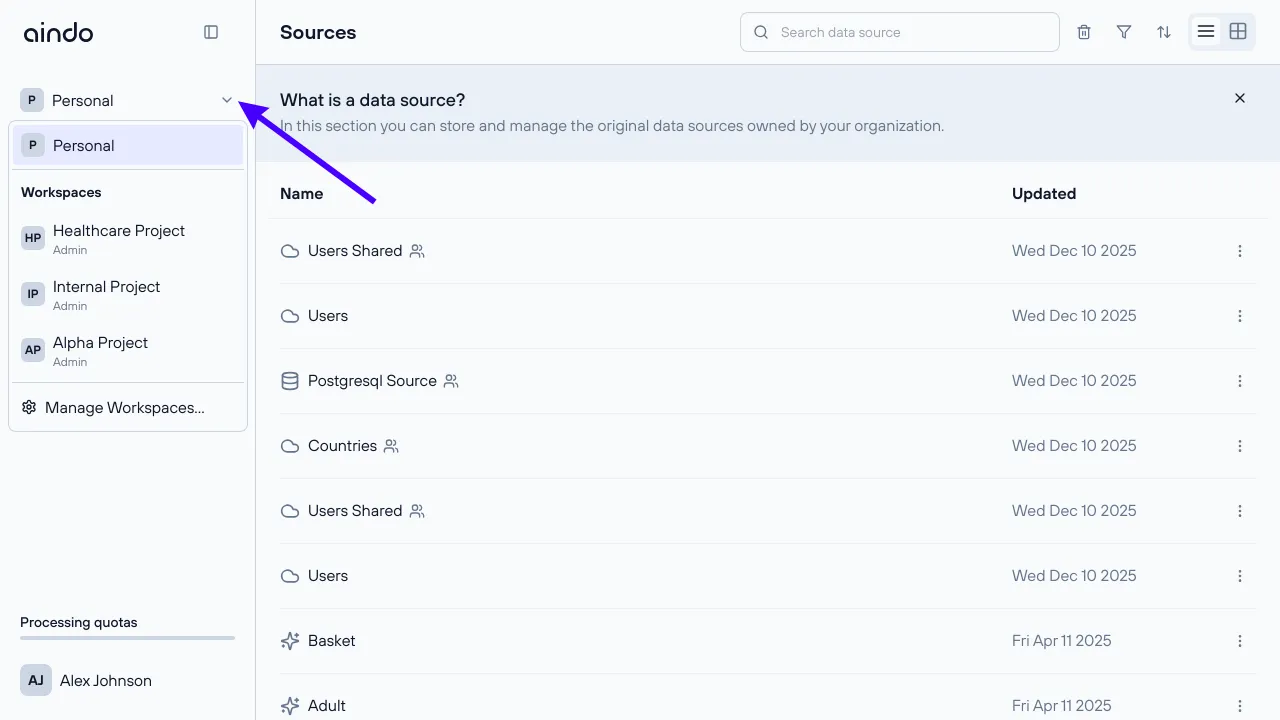
Once a workspace is selected:
- Any new resource you create (Sources, Generators, etc.) is automatically associated with the selected workspace.
- Other sections of the application (e.g., Home, Sources, Generators) will only display resources belonging to the selected workspace.